

In addition to configuring instance-level settings through the System Settings admin UI, W&B also provides a way to configure these values in code using environment variables. This page lists the environment variables you can set to control database, storage, Redis, identity provider, and other instance-level behavior for a self-managed W&B Server deployment. You can use these variables to manage configuration as code instead of through the admin UI. For IAM-specific variables, see advanced configuration for IAM.Documentation Index
Fetch the complete documentation index at: https://wb-21fd5541-docs-2661.mintlify.app/llms.txt
Use this file to discover all available pages before exploring further.
Environment variable reference
The following table describes each environment variable, the behavior it controls, and any constraints on its value.| Environment variable | Description |
|---|---|
LICENSE | Your wandb/local license |
MYSQL | The MySQL connection string |
BUCKET | The S3 / GCS bucket for storing data |
BUCKET_QUEUE | The SQS / Google PubSub queue for object creation events |
NOTIFICATIONS_QUEUE | The SQS queue on which to publish run events |
AWS_REGION | The AWS Region where your bucket lives |
HOST | The FQD of your instance, for example https://my.domain.net |
OIDC_ISSUER | A URL to your Open ID Connect identity provider, for example https://cognito-idp.us-east-1.amazonaws.com/us-east-1_uiIFNdacd |
OIDC_CLIENT_ID | The Client ID of application in your identity provider |
OIDC_AUTH_METHOD | Implicit (default) or pkce. For more context, see the following sections. |
SLACK_CLIENT_ID | The client ID of the Slack application you want to use for alerts |
SLACK_SECRET | The secret of the Slack application you want to use for alerts |
LOCAL_RESTORE | If you can’t access your instance, you can temporarily set this to true. Check the logs from the container for temporary credentials. |
REDIS | Can be used to set up an external REDIS instance with W&B. |
LOGGING_ENABLED | When set to true, access logs are streamed to stdout. You can also mount a sidecar container and tail /var/log/gorilla.log without setting this variable. |
GORILLA_ALLOW_USER_TEAM_CREATION | When set to true, lets non-admin users create a new team. False by default. |
GORILLA_CUSTOMER_SECRET_STORE_SOURCE | Sets the secret manager for storing team secrets used by W&B Weave. These secret managers are supported:
|
GORILLA_DATA_RETENTION_PERIOD | How long to retain deleted data from runs in hours. Deleted run data is unrecoverable. Append an h to the input value. For example, "24h". |
GORILLA_DISABLE_PERSONAL_ENTITY | When set to true, turns off personal entities. Prevents creation of new personal projects in their personal entities and prevents writing to existing personal projects. |
GORILLA_GRAPHQL_DISABLE_INTROSPECTION | When set to true, disables GraphQL introspection: __type and __schema queries return no schema data while the request still succeeds. On Self-Managed, setting the Gorilla configuration field graphql-disable-introspection has the same effect. Set this variable under spec.values.global.extraEnv in your WeightsAndBiases custom resource (see the global.extraEnv example in the Operator guide). Client applications require W&B SDK v0.26.0 or later against deployments with introspection already turned off. |
GRAPHQL_REJECT_UNAUTHED_REQUESTS | When set to true on the API service, rejects GraphQL requests that don’t have an authenticated user. Unauthenticated requests receive HTTP 401. Self-Managed and Dedicated Cloud v0.80.0+ only; not available on Multi-tenant Cloud. This feature is opt-in: if the environment variable is unset or not true, behavior is unchanged. Set on the API component only (for example, api.env in Helm values). Before activating, confirm that workflows that rely on anonymous GraphQL access (such as viewing shared reports without signing in, or open projects) still meet your requirements. On Self-Managed, setting the Gorilla configuration field graphql-reject-unauthed-requests to true has the same effect. |
GORILLA_ARTIFACT_GC_ENABLED | When set to true, enables garbage collection for deleted artifacts. Required for self-managed deployments. See Delete an artifact for more information. |
WANDB_ARTIFACT_DIR | Where to store all downloaded artifacts. If unset, defaults to the artifacts directory relative to your training script. Make sure this directory exists and the running user has permission to write to it. This does not control the location of generated metadata files, which you can set using the WANDB_DIR environment variable. |
WANDB_DATA_DIR | Where to upload staging artifacts. The default location depends on your platform, because it uses the value of user_data_dir from the platformdirs Python package. Make sure this directory exists and the running user has permission to write to it. |
WANDB_DIR | Where to store all generated files. If unset, defaults to the wandb directory relative to your training script. Make sure this directory exists and the running user has permission to write to it. This does not control the location of downloaded artifacts, which you can set using the WANDB_ARTIFACT_DIR environment variable. |
WANDB_IDENTITY_TOKEN_FILE | For identity federation, the absolute path to the local directory where Java Web Tokens (JWTs) are stored. |
-
Use the
GORILLA_DATA_RETENTION_PERIODenvironment variable cautiously. It applies to deleted run data (including run-associated files such as media after deletion flows). It does not delete artifacts; use artifact deletion andGORILLA_ARTIFACT_GC_ENABLEDas described in Delete an artifact. For how deleting runs and files relates to storage and this setting, see When deleted run data is removed from storage in Delete runs. Data is removed according to the retention window once the variable is set. Back up both the database and the storage bucket before you enable or change this value. Background removal of objects from your bucket is approximate and not guaranteed to finish within a specific time. For expectations, troubleshooting, and how this relates to storage costs, see Manage bucket storage and costs. -
To enable
GRAPHQL_REJECT_UNAUTHED_REQUESTSwith the Kubernetes Operator, set it on the API component only:Apply your changes and wait for the API pods to roll out before you verify the setting. You can disable the behavior by removing the variable or setting it to another value.
Advanced reliability settings
The following section describes optional configuration you can apply to improve the reliability and performance of your W&B Server deployment.Redis
An external Redis server is optional but recommended for production systems. Redis helps improve the reliability of the service and enables caching to decrease load times, especially in large projects. Use a managed Redis service such as ElastiCache with high availability (HA) and the following specifications:- Minimum 4 GB of memory, suggested 8 GB
- Redis version 6.x
- In transit encryption
- Authentication enabled
http(s)://YOUR-W&B-SERVER-HOST/system-admin. Enable the Use an external Redis instance option, and fill in the Redis connection string in the following format:
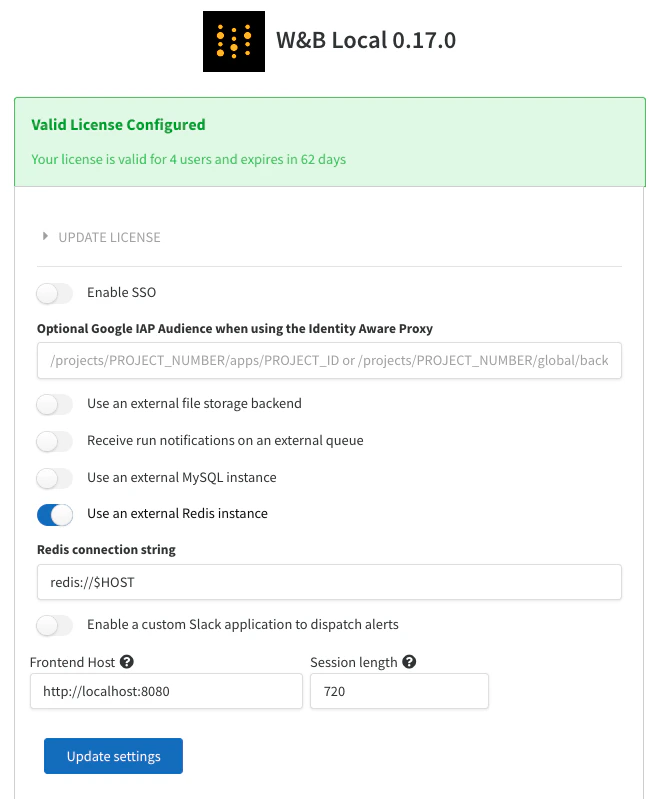
REDIS on the container or in your Kubernetes deployment. Alternatively, you can set up REDIS as a Kubernetes secret.
This page assumes the Redis instance is running at the default port of 6379. If you configure a different port, set up authentication, and want TLS enabled on the redis instance, the connection string format is: redis://$USER:$PASSWORD@$HOST:$PORT?tls=true